
Whathappens After We Input Url To Browser
A quick summary for how the browser find and load websites. Also briefly cover some relevant topics.
What happens after we input url to browser
-
Input url
When we type an url link (e.g. www.image.google.com) into address bar of the browser, browser searches from history, bookmark, or cache for strings to match our input parts and provides suggestion (e.g. auto fill up the remaining part of the url). Some browsers may even load the webpage from our caches before we press enter.
-
Resolve domain name
Now we press the enter key, the first thing the browser need to do is to resolve the domain name.
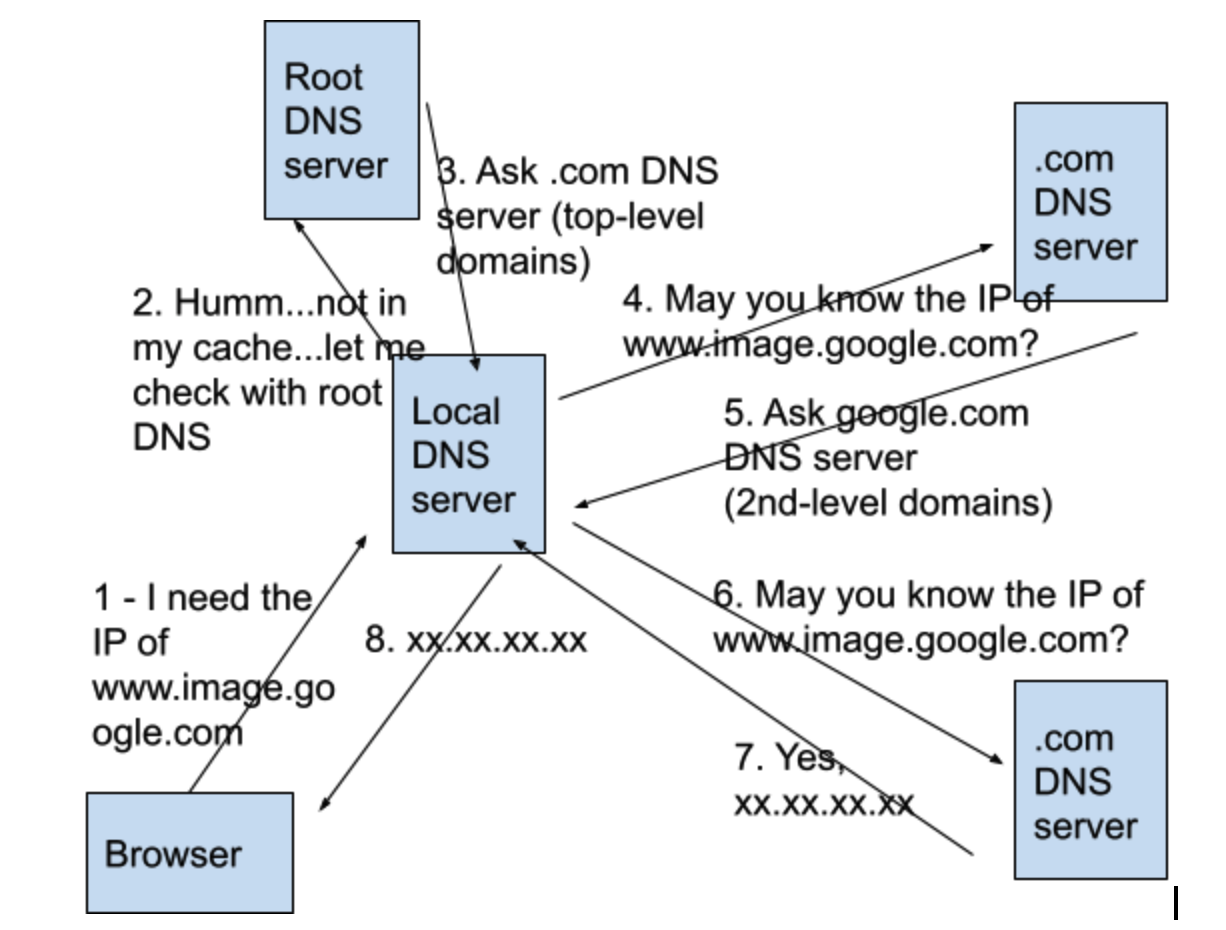
- Browser checks caches of DNS records to find a matching IP address: first browser cache, then OS cache (the local host file), third router cache, and finally ISP cache (our internet service provider). Return if find a match, otherwise continue to step 2.
- Local DNS server (the ISP DNS server, we call it DNS recursor) initiates a DNS query to recursively search for matching IP of the requested domain. Recursive means the search continues from one DNS server to another until correct IP is found. If still no match, Local DNS server queries root DNS server. UDP is used for DNS queries.
- Root DNS server tells local DNS server which domain DNS server (e.g. .com domain name server) it should ask. Then local DNS server asks .com DNS server and .com DNS server say “go ask google.com DNS server, here is its IP address”. This step conducts iteratively.
- Finally local DNS server get the IP address. It returns the IP to our browser and also save the record in its cache.
-
Handshake between browser (client) and server
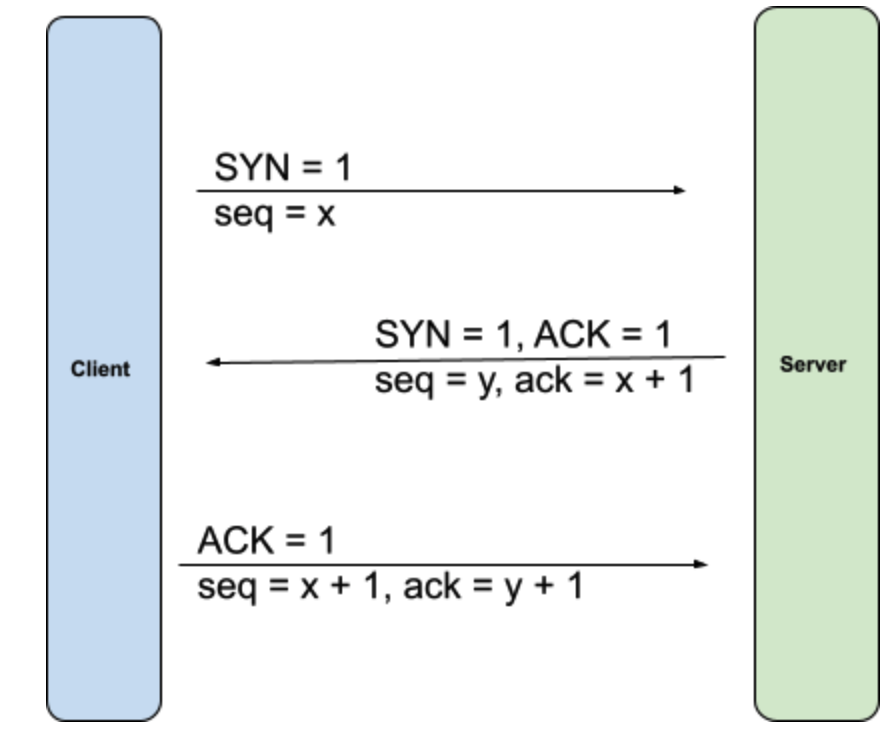
Once get the server IP, our browser sends a TCP connection request to server. Connection is established by 3-way handshake.
-
Browser sends HTTP request to server
We are ready to transfer data between browser and server after TCP connection is established. The browser sends a GET request to server for www.image.google.com webpage.
GET https://www.google.com/ HTTP/1.1 accept: text/html,application/xhtml+xml,application/xml;q=0.9,image/avif,image/webp,image/apng,*/*;q=0.8,application/signed-exchange;v=b3;q=0.9 accept-encoding: gzip, deflate, br accept-language: en-US,en;q=0.9 cache-control: max-age=0 cookie: ******** user-agent: Mozilla/5.0 (Macintosh; Intel Mac OS X 10_14_0) AppleWebKit/537.36 (KHTML, like Gecko) Chrome/88.0.4324.96 Safari/537.36 -
Server handles the request and send respond to client
The respond contains status code (2xx, 3xx, 4xx, 5xx), respond header (content-type (text/html), content-encoding (compression type, e.g. gzip), cache-control, date time, etc), body (webpage contain, etc).
HTTP/1.1 OK cache-control: private, max-age=0 content-encoding: br content-length: 63092 content-type: text/html; charset=UTF-8 date: Mon, 01 Feb 2021 04:03:04 GMT expires: -1 server: gws set-cookie: OTZ=; expires=Mon, 01-Jan-1990 00:00:00 GMT; path=/; domain=google.com set-cookie: OTZ=; expires=Mon, 01-Jan-1990 00:00:00 GMT; path=/; domain=.google.com set-cookie: SIDCC=AJi4QfHL3HjbiH*********msJGnD-pQk9MOOF7Km0; expires=Tue, 01-Feb-2022 04:03:04 GMT; path=/; domain=.google.com; priority=high strict-transport-security: max-age=31536000 x-frame-options: SAMEORIGIN x-xss-protection: 0 -
Browser display webpage content
Browser resolve the html page from top to bottom and render while loading. It render bare bone HTML skeleton first then check HTML tags. When there are external resources, e.g. image, video, CSS style sheet, browser sends out GET request asynchronously.
Done! Enjoy your webpage.
Relevant topics
DNS hierarchy
----------------- Root domain ------------------

------------- Top-level domains -----------------
          com edu org gov ca cn us

------------- Second-level domains -----------------
       google.com, wikipedia.org, canada.ca

--------- Third-level domains (sub-domains)---------
   image.google.com, en.wikipedia.org, www.abc.com
Internet protocols
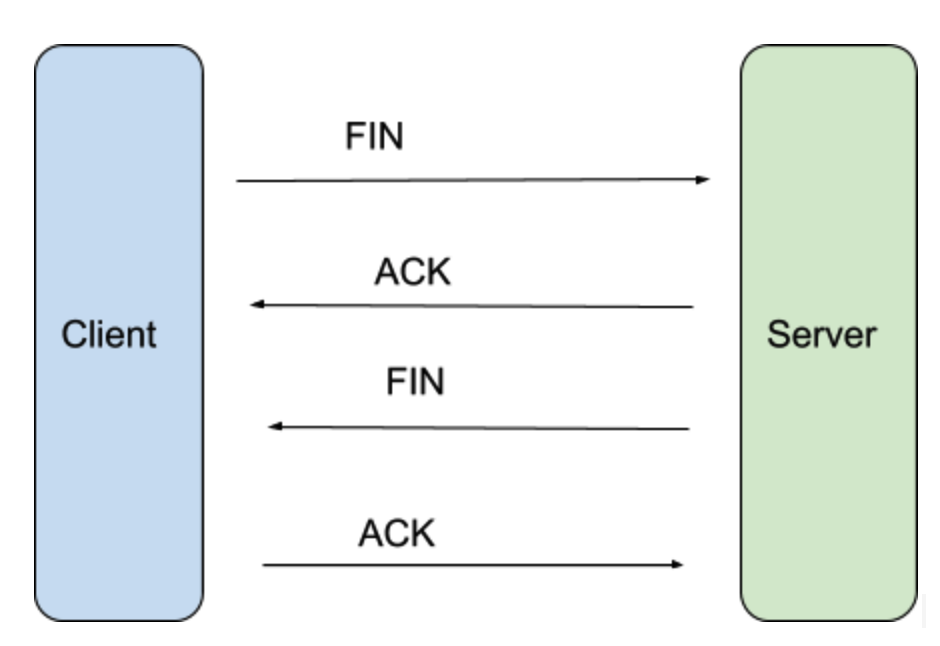
TCP (reliable)
Connect with 3-way handshake
Disconnect with 4-way handshake
UDP (best-effort)
HTTP request
- POST: (personally prefer to use for create)
- PUT: idempotent, get same result no matter the action is executed how many time (personally prefer to use for edit)
- GET
- DELETE
- HEAD: identical request of GET but without the response body
- CONNECT: establishes a tunnel to the server of for target resource
- OPTIONS: describe the communication options for target resource
- TRACE: message loop-back test
- PATCH: partial modifications to a resource
HTTP respond status code
- 1xx informational message
- 2xx success
- 200 OK
- 201 created
- 202 accepted
- 3xx redirects
- 300 multiple choice
- 301 moved permanently (browser replace old address with new address )
- 302 found (moved temporarily)
- 308 Permanent Redirect, same semantics as 301, except that the user agent must not change the HTTP method used: If a POST was used in the first request, a POST must be used in the second request
- 4xx error on client
- 400 Bad Request (server doesn’t understand the request)
- 401 Unauthorized (actually means
unauthenticated) - 403 Forbidden (no access right)
- 404 Not Found
- 408 Request Timeout
- 414 URI Too Long
- 429 Too Many Requests
- 418 I’m a teapot (fun way to say ‘server wish not to handle this request’)
- 5xx error on server
- 500 Internal Server Error
- 502 Bad Gateway
- 503 Service Unavailable
- 504 Gateway Timeout